Skip to content
  • Android
  • Java
  • 33% OFF

Online Examination App with Smart Proctoring

Online Examination App with Smart Proctoring is a final year Android project with source code where students take timed MCQ tests on their phone and every student gets a differently shuffled paper. The app records when a student leaves the test screen, takes front-camera photos with face check, and shows the score with topic-wise analysis instantly. Includes the teacher app, admin panel, database, full report and setup help.

ForDiplomaMCAB.Tech· CSE, IT

Platform
Android + Web API
1-on-1 setup
AnyDesk / Meet
Setup time
2 Hour
Download access
8 months
  • Source code
  • Project report
  • Setup guide
1 / 5

About this project

Colleges run many unit tests and quizzes, and paper-based MCQs take time to set, check and analyse. Online tests on a phone are easy to cheat in: students switch apps, look up answers or let someone else sit in. This online examination app Android project solves both problems. Teachers build tests from a question bank, every student gets a shuffled paper, and the app watches the test with rule-based proctoring: app-leave detection, timed camera photos and a face check. Results with topic-wise analysis are ready the moment the student submits.

How it works

  • The teacher adds MCQs to the question bank by subject and topic, with difficulty, marks and explanation
  • The teacher creates a test in 3 steps: details, questions per topic, schedule and proctoring rules
  • Each student gets a random paper: questions and options are shuffled per student
  • During the test the app shows a timer, an OMR-style answer sheet and a "leaves allowed" band
  • Leaving the test screen (or split screen) is recorded; after the set limit the test submits itself
  • The front camera takes a photo every 60 seconds and counts faces (no face / two faces are flagged)
  • The score, rank, integrity score and topic-wise bars are shown right after submitting, with a PDF

Users

  • Student: takes proctored tests, sees results and weak topics, practises by topic, earns badges
  • Teacher: manages the question bank, creates tests, watches the live monitor, reviews proctor reports
  • Admin (web panel): approves teachers, manages subjects, students, tests, flags, reports and settings

Highlights

  • 3 roles, 20 app screens + 3 teacher tabs, 13 admin pages, 34 PHP APIs, 15 MySQL tables
  • Integrity score from app leaves, no-face and two-face photos (penalties set by the admin)
  • Live monitor refreshes every 10 seconds; teacher accepts the result or marks malpractice
  • Answers are hidden until the test closes; deadline and auto-submit are enforced on the server
  • Login token, password hashing, prepared statements, CSRF-protected admin forms
  • Full validation on every form (app and server); 204 sample MCQs and ready demo logins

What you get

  • Complete Android source code (Java, Android Studio)
  • PHP API and admin panel source code
  • MySQL database file with realistic sample data
  • Project report (Word + PDF) with all UML, DFD and ER diagrams
  • 2-page project abstract (Word + PDF)
  • Project explanation with 18 viva questions and answers
  • Installation and setup guide with a first run checklist

Who can use this project

Final year students of BE / B.Tech, MCA, BCA and Diploma (CSE, IT, ENTC) looking for an Android project with source code and documentation. It suits topics like online examination system, e-learning, smart proctoring and student assessment apps.

Frequently asked questions

Does it need internet to run? No. The phone and the PC with XAMPP only need to be on the same Wi-Fi network. Can two students get the same paper? They get questions from the same topics, but the question order and option order are shuffled for each student. How is cheating detected? The app records every time the student leaves the test screen and takes front-camera photos; photos with no face or two faces are flagged for the teacher. Can I change the number of allowed app leaves? Yes. The teacher sets it for each test, and the admin sets the default and the penalty points.

Who can take it

  • Diploma (Polytechnic) · best fit
  • MCA · best fit
  • BE / B.Tech · best fit

Branches: Computer Science & Engineering (CSE), Information Technology (IT)

We make it easy for you

  • 1-on-1 session on AnyDesk or Google Meet
  • We install the full project on your laptop
  • We explain the flow, modules and database for your viva
  • Report and step-by-step setup guide included
  • WhatsApp help whenever you get stuck

What you get

Everything unlocks in My projects right after payment.

  • Source codeComplete, working source code
  • Project reportEditable report / documentation
  • Setup guideStep-by-step installation guide

Project report preview

The first 5 pages of the report that comes with this project — 66 pages in the full report. Tap a page to read it — swipe for the next page.

Included free with this project

1-on-1 setup session on AnyDesk or Google Meet

After you buy, we schedule a session at a time that suits you. Our developer installs the complete project on your own laptop, runs it with you and explains it — so you can present it with confidence.

  1. 1

    Pick a time

    We call or WhatsApp you to fix the slot

  2. 2

    We install it

    Full setup on your system over AnyDesk

  3. 3

    We explain it

    Flow, modules and database on Google Meet

Modules inside

18 working modules — each one is explained in the report.

  • Student registration and login with session token
  • Student dashboard with next test card and countdown
  • Upcoming, live and completed tests list
  • Rules screen with camera and face check before the test
  • Shuffled paper per student (questions and options)
  • Exam screen with timer, OMR answer sheet and mark for review
  • App-leave and split-screen detection with auto submit
  • Front-camera photo every 60 seconds with face count
  • Instant result with rank, integrity score and topic-wise analysis
  • Result PDF and answer review after the test closes
  • Practice by topic with streak, accuracy and badges
  • Teacher question bank with add, edit and filters
  • Create test wizard with topics, schedule and proctoring rules
  • Live monitor of students writing the test
  • Proctor report with photos, warnings timeline and decision
  • Class results with topic-wise scores and PDF
  • Admin panel: teachers approval, subjects, students, tests, flags
  • Admin reports, notices and proctoring settings

Want an extra module or a change?

We can add the features your guide asked for. Tell us what to change and get a quote on WhatsApp.

Customise this project

Technology used

Built with
Android (Java) - Android StudioVolley (API calls)CameraX (front camera photos)Android FaceDetector (face count)PdfDocument (result PDFs)PHP 8 (APIs + Admin Panel)MySQL (XAMPP / phpMyAdmin)HTML, CSS, JavaScript (admin panel)
Runs as
Android + Web API
Setup time
2 Hour with the guide
Documents
Project abstract (Word + PDF, 2 pages), Project report (Word + PDF, 66 pages, with all UML / DFD / ER diagrams), Project explanation with 18 viva questions, Installation / setup guide with first run checklist, Database SQL file with sample data, App and admin panel screenshots, README quick start

How buying works

  1. 1

    Read the free abstract

    Sign in and download it (3 per day)

  2. 2

    Pay securely

    UPI, card or net banking

  3. 3

    Download instantly

    Source code and report in My projects for 8 months

  4. 4

    1-on-1 setup session

    We install it on your laptop and explain it

How to run it

An overview — the full guide comes with the project, and we help you if anything doesn’t start.

  1. 1Install XAMPP and start Apache and MySQL
  2. 2Copy the 46-examshield web folder to C:\xampp\htdocs\academic-projects\
  3. 3Open phpMyAdmin and import Database\android_examshield.sql
  4. 4Open the admin panel and log in with admin / admin123
  5. 5Open Android_App\ExamShield in Android Studio and let Gradle sync (needs internet once)
  6. 6If asked "Gradle 8.9 is incompatible with JVM 25", click Use JVM 21
  7. 7Run the app; on the login screen set the server IP (emulator 10.0.2.2 or your PC's IPv4)
  8. 8Log in as student riya.k@pccoe.edu.in / 123456 and start the live DS Unit test 2
  9. 9Log in as teacher anil.deshmukh@pccoe.edu.in / 123456 to watch the live monitor

Questions about Online Examination App with Smart…

What do I get when I buy Online Examination App with Smart…?

Complete source code, the database, project abstract (word + pdf, 2 pages), project report (word + pdf, 66 pages, with all uml / dfd / er diagrams), project explanation with 18 viva questions and help to run it on your laptop. Files unlock in your dashboard right after payment.

Can I see the abstract before buying?

Yes. Sign in and download the free abstract from this page, and check it with your guide first.

Will you help me run and explain the project?

Yes. After you buy, we schedule a 1-on-1 session on AnyDesk or Google Meet. Our developer installs the complete project on your own laptop, runs it with you and explains the flow, modules and database so you are ready for your viva.

Can the project be changed for my college?

Small changes such as adding a module or changing fields are possible. Tell us before you pay and we will confirm what we can do and the cost.

Which courses is Online Examination App with Smart… suitable for?

It suits Diploma (Polytechnic), MCA, BE / B.Tech students from Computer Science & Engineering (CSE) and Information Technology (IT).

Similar projects

All Android projects →
AndroidJava33% OFF

Diploma (Polytechnic), MCA, BE / B.Tech

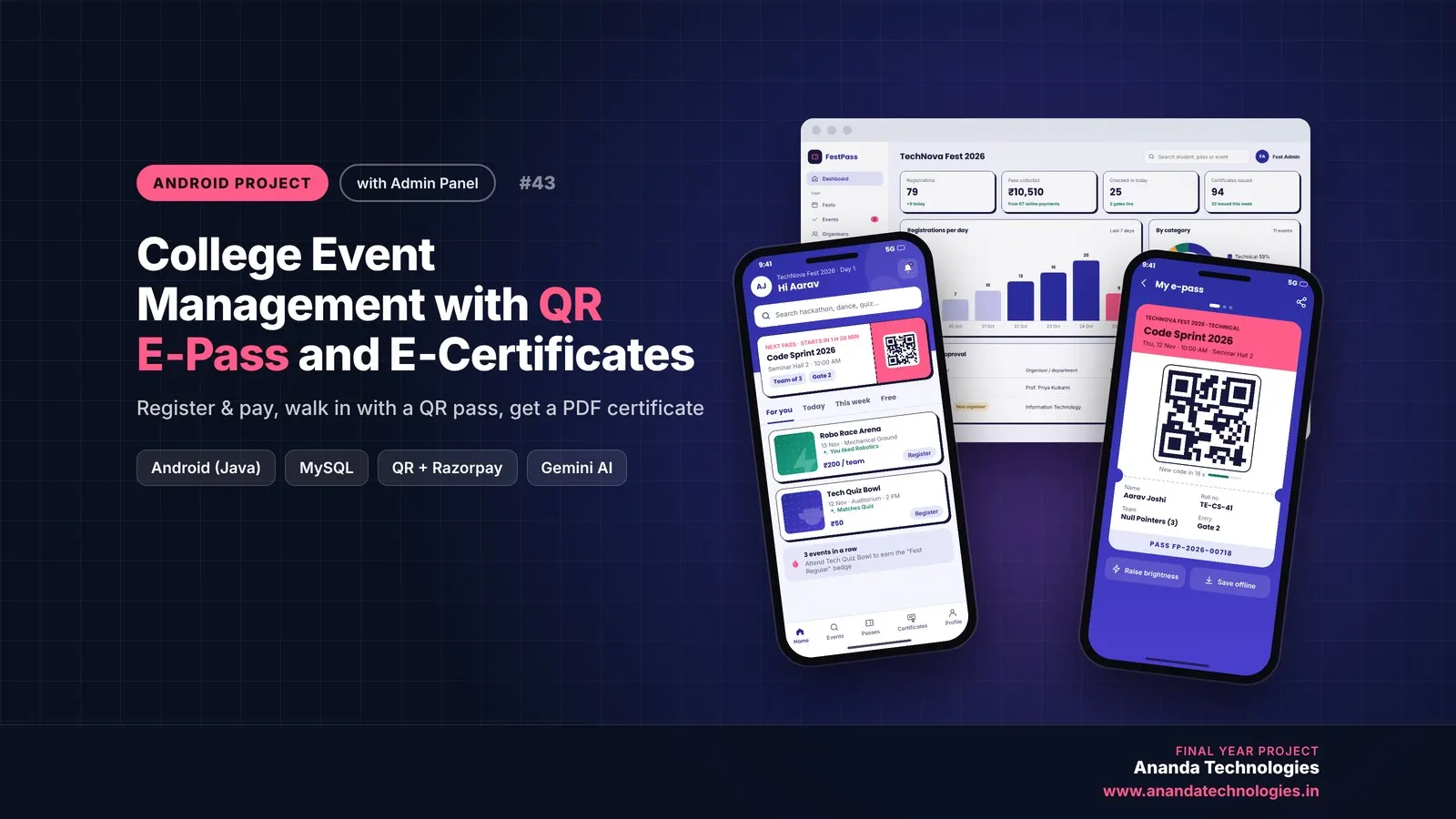
College Event Management with QR E-Pass and E-Certificates

College Event Management with QR E-Pass is a final year Android project with source code where students register and pay for fest events, walk in with a rotating QR e-pass and download PDF participation certificates. Organisers scan passes at the gate, publish results and see AI summaries, while the admin approves events and tracks everything from a web panel. Includes database, 76-page report, abstract and setup guide.

Project price₹8,000₹12,000View Project
AndroidJava33% OFF

Diploma (Polytechnic), MCA, BE / B.Tech

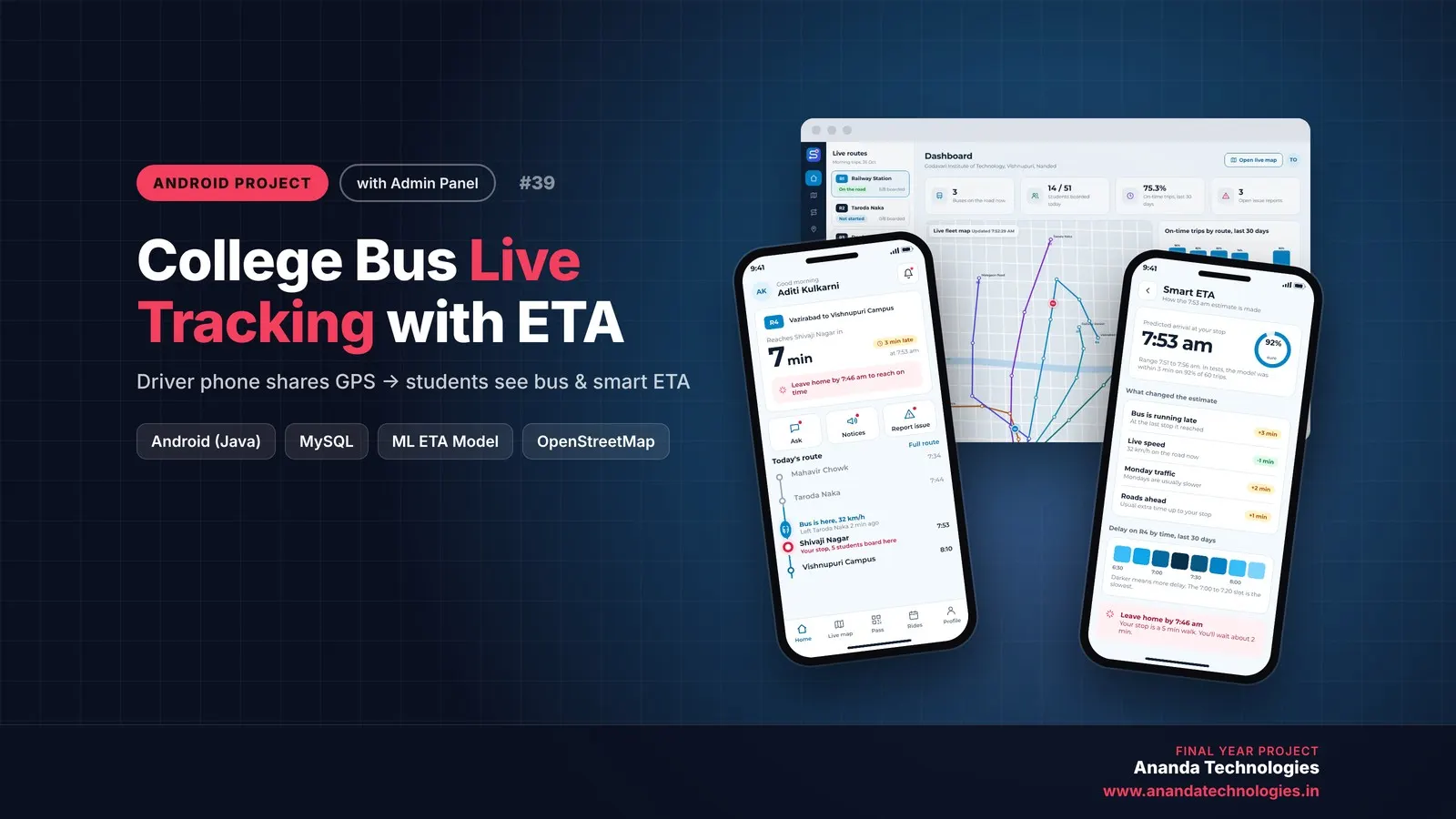
College Bus Live Tracking with ETA

College Bus Live Tracking with ETA is a final year Android project with source code that shows students exactly where their college bus is and when it will reach their stop. A machine learning ETA model trained inside the app predicts arrival from 30 days of trip history, while drivers share live GPS and scan a rotating QR bus pass. Includes the PHP admin panel, MySQL database, 55-page report and setup help.

Project price₹8,000₹12,000View Project
AndroidJava33% OFF

Diploma (Polytechnic), MCA, BE / B.Tech

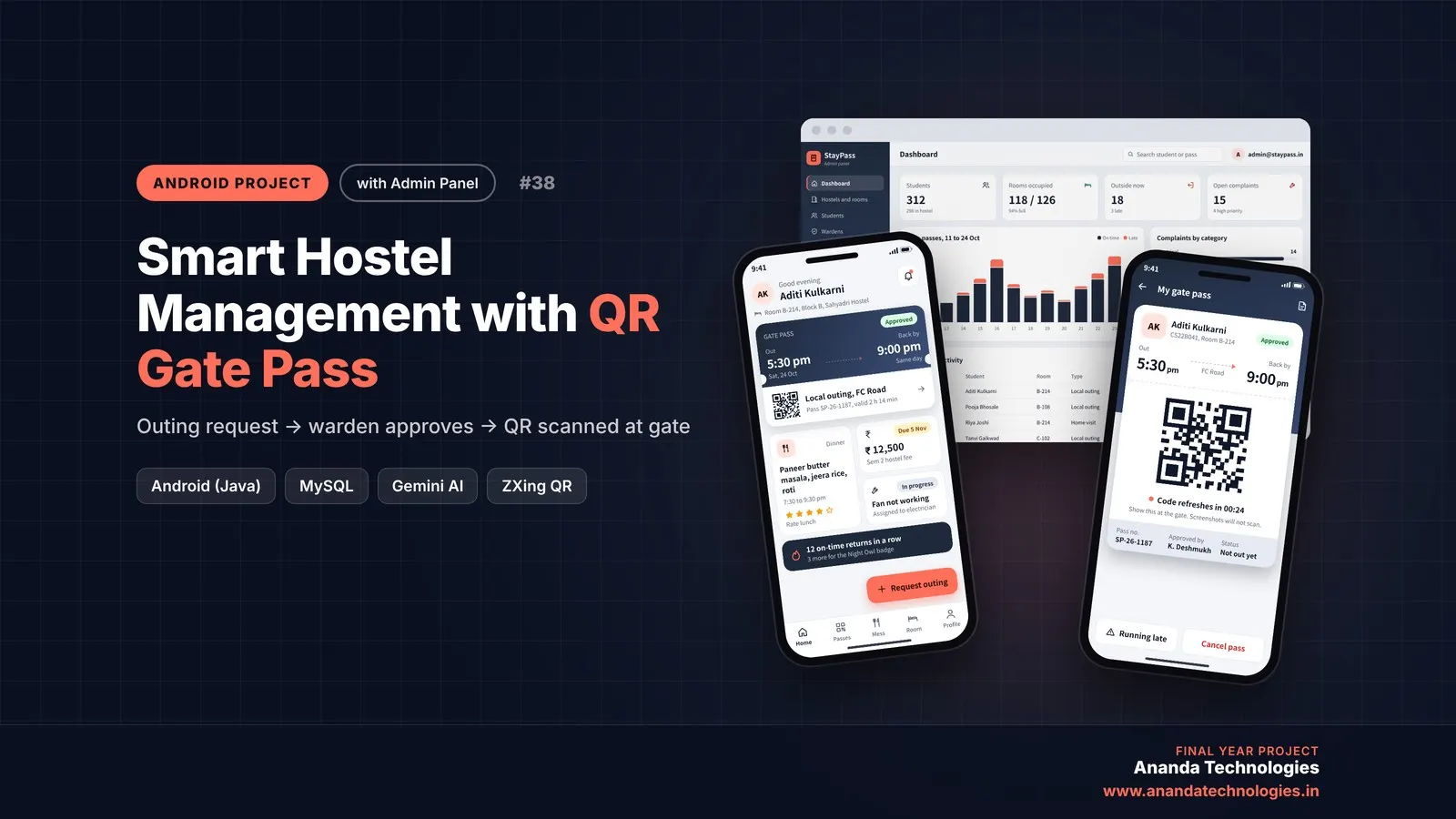
Smart Hostel CareTaking with QR Gate Pass

StayPass is a QR gate pass hostel management Android project, a final year Android project with source code. Students request outings in the app, the warden approves them with an AI return-risk score, and a QR pass that changes every 30 seconds is scanned at the gate while parents get an SMS. Includes a warden app, PHP admin panel, MySQL database, 54-page report with diagrams, abstract and setup help.

Project price₹8,000₹12,000View Project
None of these fit your topic?Send your idea — we build it and share the quote first.Request custom project

Get Online Examination App with Smart… for your submission

Leave your details and a counsellor will call to confirm your branch, any changes your guide needs, and how you want to pay.