Skip to content
  • Android
  • Java
  • 33% OFF

Smart Blood Donor Finder and Emergency Request System

Smart Blood Donor Finder and Emergency Request System (BloodLink) is a final year Android project with source code in which hospitals post urgent blood requests and only nearby, compatible donors who completed the 90-day gap are alerted, ranked by a smart match score. Donors accept, travel with a map and verify with a 4-digit code; blood banks track group-wise stock with a shortage forecast and Gemini AI summary. Includes admin panel, MySQL database, 70-page report with diagrams, abstract and setup guide.

ForDiplomaMCAB.Tech· CSE, IT

Platform
Android + Web API
1-on-1 setup
AnyDesk / Meet
Setup time
2 Hour
Download access
8 months
  • Source code
  • Project report
  • Setup guide
1 / 5

About this project

In an emergency, hospitals still call long donor lists and forward messages, and most calls reach people who are far away, have the wrong blood group or donated a few weeks ago. Blood donor finder Android project BloodLink solves this: a hospital posts one request and the system alerts only donors who can really donate — compatible group, inside the chosen radius and past the 90-day gap. Everyone sees who is coming, and every donation is verified with a code.

How it works

  • Hospital posts a request: blood group, units, component, urgency, needed-by time and radius.
  • The server finds compatible groups, removes ineligible donors (90-day gap, age 18–65, weight 50 kg+) and measures distance with the haversine formula.
  • Each donor gets a match score out of 100 (blood group 40, distance 30, rest days 15, reliability 15); the top 50 are alerted.
  • The donor sees the request on an OpenStreetMap map, checks why they were matched, accepts and shares an ETA.
  • At the blood bank the donor shows a 4-digit code; staff enter it with the Hb value to verify the donation.
  • The donor gets a PDF certificate, badges and the next eligible date; the request closes when all units are collected.
  • Blood banks update stock; the app plots 7-day usage, forecasts days left per group and Gemini writes a short summary.

Users

  • Donor (app): map of nearby requests, match score, accept and track, AI self check, donor assistant, history, certificate, badges, camps.
  • Hospital / Blood bank (app): post requests, see eligible donor count, track responders, verify code, stock, analytics and forecast, camps.
  • Admin (web): dashboard with charts, donors, hospital approval, requests, donations, stock of all banks, camps, badges, notices, reports, settings.

Highlights

  • 3 roles, 24 app screens, 13 admin pages, 34 APIs, 15 database tables
  • Smart donor matching with a transparent score and the 90-day eligibility rule
  • Gemini AI self check, donor assistant and stock summary, all with offline fallback
  • Least-squares shortage forecast with colour rings and 7-day chart
  • Code-based donation verification, PDF certificate, badges, streak and leaderboard
  • Validations on every form in the app and on the server; hashed passwords and prepared statements
  • Sample data of 44 donors and 6 hospitals in Pune; demo logins for every role

What you get

  • Complete Android Studio project (Java) and PHP admin panel source code
  • MySQL database file with sample data
  • Project report (Word, 70 pages) with DFD, ER, UML, sequence, activity and state diagrams
  • 2-page project abstract (Word + PDF) and project explanation with 22 viva questions
  • Setup guide (Word + PDF) and online installation help

Who can use this project

Final year BE / B.Tech, MCA, BCA, M.Tech and Diploma students of Computer Engineering, IT and related branches who want an Android project with source code and documentation on healthcare, location-based matching or blood bank management.

Frequently asked questions

Does it need a Google Maps API key? No. Maps use OpenStreetMap through osmdroid, which needs no key.

Will the AI features work without a Gemini key? Yes. Self check tips, the assistant and the stock summary switch to built-in offline answers.

How do donors get alerts? The app checks for new alerts every 30 seconds on the home screen and every 15 minutes in the background, and shows a phone notification.

Can it run on a real phone? Yes. Keep the phone and laptop on the same Wi-Fi and enter the laptop IP in the server field on the login screen.

Who can take it

  • Diploma (Polytechnic) · best fit
  • MCA · best fit
  • BE / B.Tech · best fit

Branches: Computer Science & Engineering (CSE), Information Technology (IT)

We make it easy for you

  • 1-on-1 session on AnyDesk or Google Meet
  • We install the full project on your laptop
  • We explain the flow, modules and database for your viva
  • Report and step-by-step setup guide included
  • WhatsApp help whenever you get stuck

What you get

Everything unlocks in My projects right after payment.

  • Source codeComplete, working source code
  • Project reportEditable report / documentation
  • Setup guideStep-by-step installation guide

Project report preview

The first 5 pages of the report that comes with this project — 70 pages in the full report. Tap a page to read it — swipe for the next page.

Included free with this project

1-on-1 setup session on AnyDesk or Google Meet

After you buy, we schedule a session at a time that suits you. Our developer installs the complete project on your own laptop, runs it with you and explains it — so you can present it with confidence.

  1. 1

    Pick a time

    We call or WhatsApp you to fix the slot

  2. 2

    We install it

    Full setup on your system over AnyDesk

  3. 3

    We explain it

    Flow, modules and database on Google Meet

Modules inside

18 working modules — each one is explained in the report.

  • Donor two-step login and avatar-first registration
  • Map of nearby matching blood requests with eligibility ring
  • Request detail with smart match score break-up
  • Accept / decline request with ETA and 4-digit arrival code
  • On-the-way screen with route, arrival and cancel
  • AI pre-donation self check with tips (offline fallback)
  • AI donor assistant chat
  • Donation history and PDF donation certificate
  • Badges, donation streak and city leaderboard
  • Blood donation camps with registration
  • Hospital registration with admin approval
  • Post urgent blood request with eligible donor count
  • Responders list, code + Hb verification, close request
  • Group-wise blood stock update
  • Stock analytics: 7-day chart, shortage forecast, AI summary
  • Hospital camps and notifications
  • Admin dashboard, donors, hospital approval, requests, donations, stock
  • Admin camps, badges, notices, printable reports and settings

Technology used

Built with
Android (Java) - Android StudioVolley (HTTP + JSON)OpenStreetMap - osmdroidPHP 8 (APIs + Admin Panel)MySQL (XAMPP / phpMyAdmin)Google Gemini API (with offline fallback)Android PdfDocument and JobScheduler
Runs as
Android + Web API
Setup time
2 Hour with the guide
Documents
Project abstract (Word + PDF, 2 pages), Project report (Word, 70 pages, with all DFD / ER / UML diagrams), Project explanation with 22 viva questions (Word + PDF), Installation / setup guide (Word + PDF), Database SQL file with sample data, App mockups, admin screenshots and diagram source files, README with demo logins

How buying works

  1. 1

    Read the free abstract

    Sign in and download it (3 per day)

  2. 2

    Pay securely

    UPI, card or net banking

  3. 3

    Download instantly

    Source code and report in My projects for 8 months

  4. 4

    1-on-1 setup session

    We install it on your laptop and explain it

How to run it

An overview — the full guide comes with the project, and we help you if anything doesn’t start.

  1. 1Install XAMPP and start Apache and MySQL
  2. 2Copy Web_PHP\37-blood-link to C:\xampp\htdocs\academic-projects\37-blood-link
  3. 3Import Database\android_blood_link.sql in phpMyAdmin
  4. 4Open http://localhost/academic-projects/37-blood-link and login admin@bloodlink.in / admin123
  5. 5Optional: paste a free Gemini API key in Admin > Settings
  6. 6Open Android_App\BloodLink in Android Studio and wait for Gradle sync
  7. 7If asked "Gradle 8.9 is incompatible with JVM 25", click Use JVM 21
  8. 8Run on emulator or phone; set server 10.0.2.2 (emulator) or laptop IP on the login screen
  9. 9Login as donor 9822041763 / donor123 or hospital 9850012345 / hospital123

Questions about Smart Blood Donor Finder and Emergency…

What do I get when I buy Smart Blood Donor Finder and Emergency…?

Complete source code, the database, project abstract (word + pdf, 2 pages), project report (word, 70 pages, with all dfd / er / uml diagrams), project explanation with 22 viva questions (word + pdf) and help to run it on your laptop. Files unlock in your dashboard right after payment.

Can I see the abstract before buying?

Yes. Sign in and download the free abstract from this page, and check it with your guide first.

Will you help me run and explain the project?

Yes. After you buy, we schedule a 1-on-1 session on AnyDesk or Google Meet. Our developer installs the complete project on your own laptop, runs it with you and explains the flow, modules and database so you are ready for your viva.

Can the project be changed for my college?

Small changes such as adding a module or changing fields are possible. Tell us before you pay and we will confirm what we can do and the cost.

Which courses is Smart Blood Donor Finder and Emergency… suitable for?

It suits Diploma (Polytechnic), MCA, BE / B.Tech students from Computer Science & Engineering (CSE) and Information Technology (IT).

Similar projects

All Android projects →
AI & MLJava33% OFF

Diploma (Polytechnic), MCA, BE / B.Tech

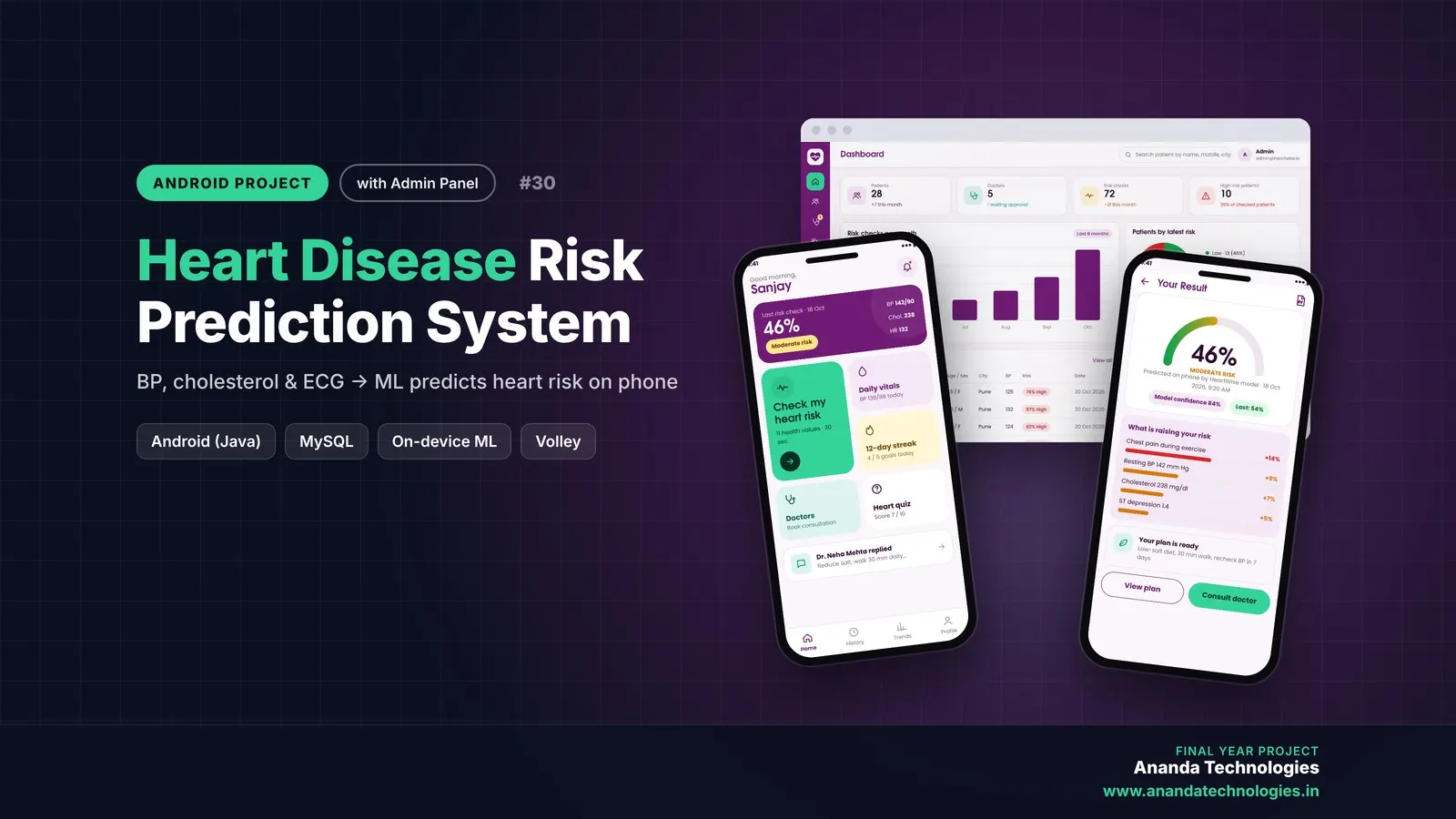
Heart Disease Risk Prediction System

Heart Disease Risk Prediction System (HeartWise) is a final year Android project with source code that predicts heart disease risk from 11 clinical values using a neural network running on the phone itself. Patients get an explained risk score, PDF report, trends and daily goals, doctors send advice and e-prescriptions, and an admin panel manages everything. Includes database, 54-page report, abstract and setup guide.

Project price₹8,000₹12,000View Project
AI & MLJava33% OFF

Diploma (Polytechnic), MCA, BE / B.Tech

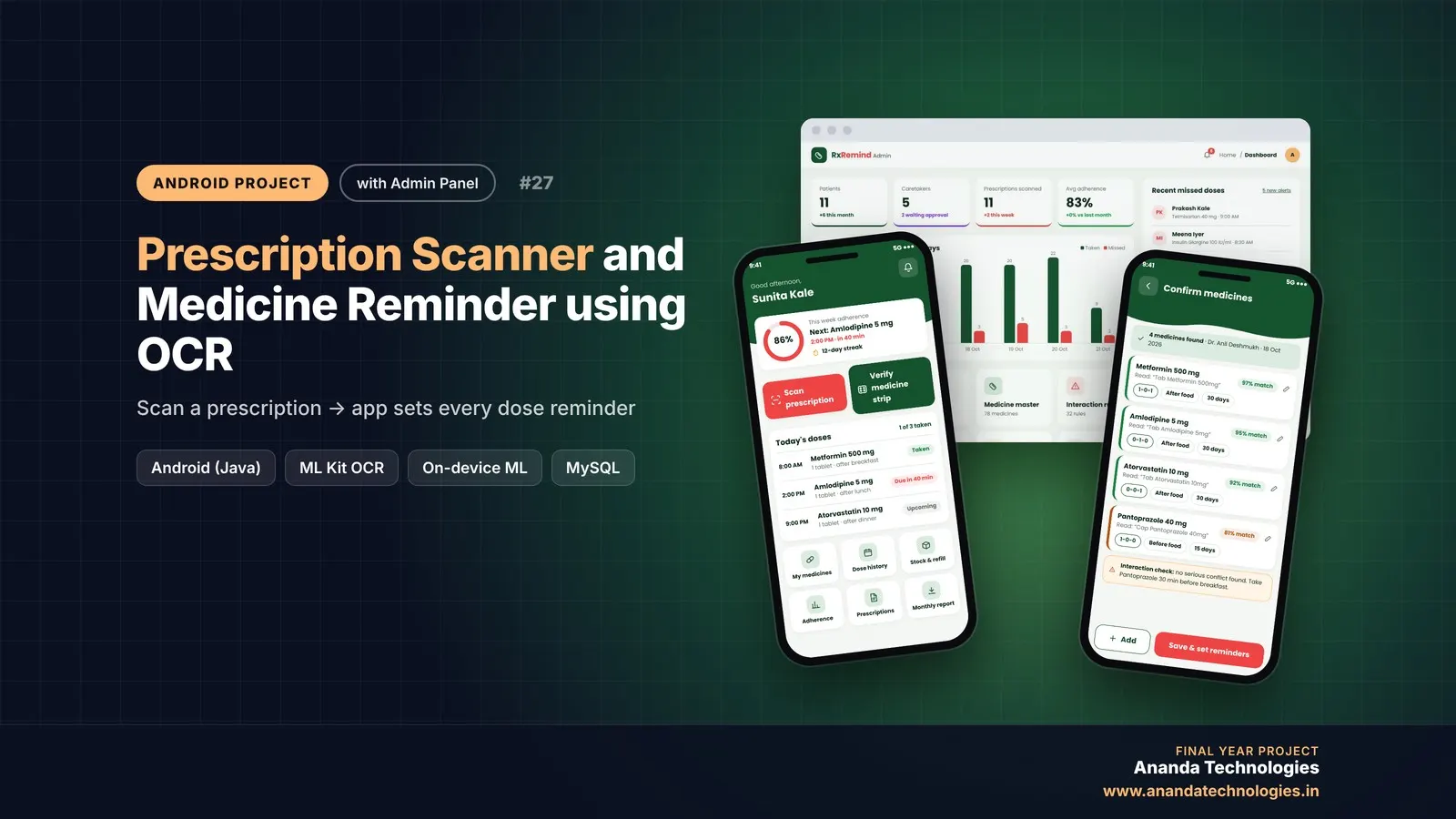
Prescription Scanner and Medicine Reminder using OCR

Prescription Scanner and Medicine Reminder is a final year Android project with source code that reads a doctor's prescription with ML Kit OCR and turns it into dose-by-dose reminders. Patients get alarms, strip verification and adherence reports, caretakers get missed-dose alerts, and the admin manages everything from a web panel. Includes the full Android app, PHP admin panel, MySQL database, 55-page report and setup guide.

Project price₹8,000₹12,000View Project
AI & MLJava33% OFF

Diploma (Polytechnic), MCA, BE / B.Tech

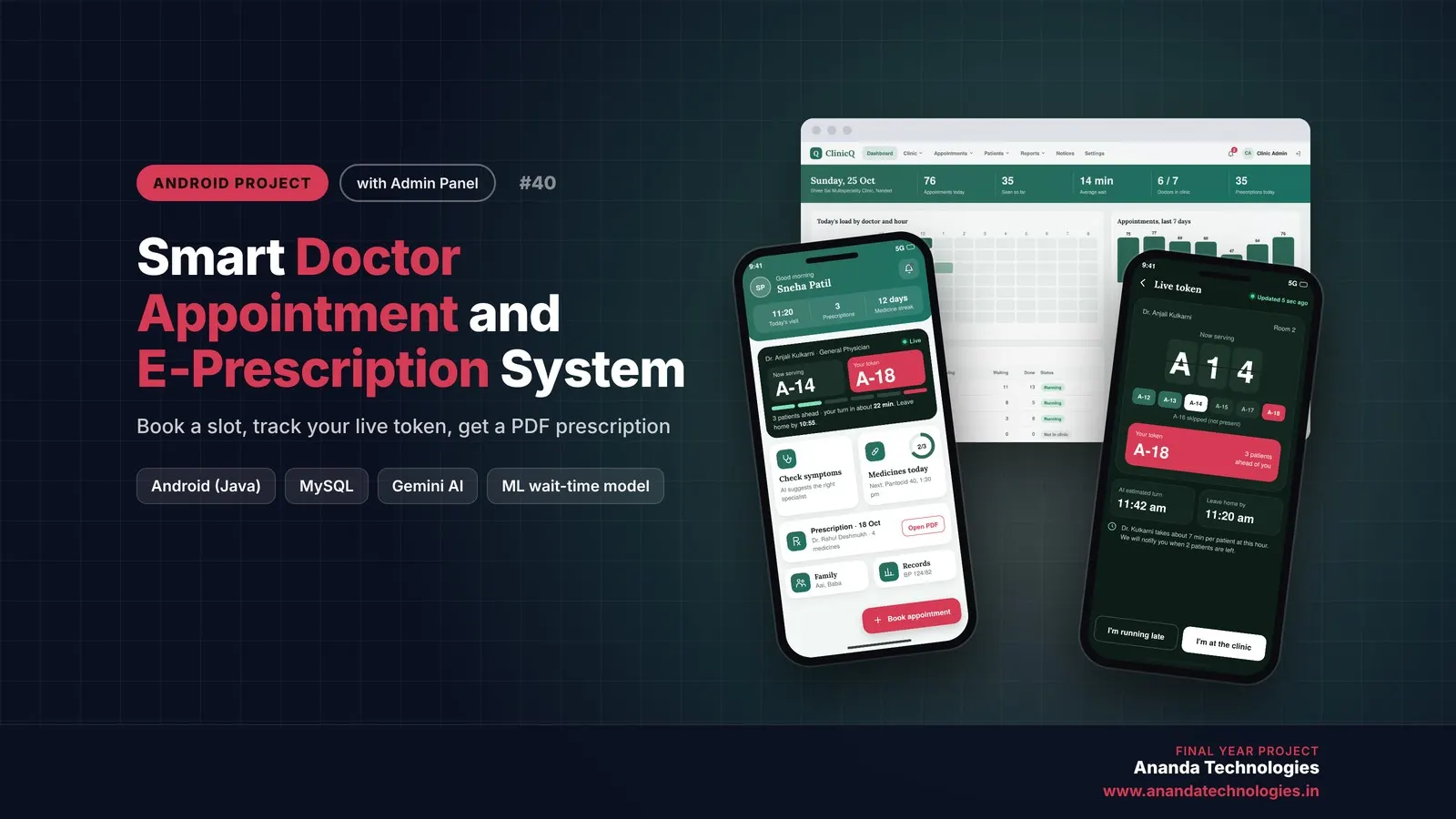
Smart Doctor Appointment and E-Prescription System

ClinicQ is a doctor appointment Android project with source code for final year students: patients book a slot, watch a live queue token with an AI wait-time estimate, and receive a PDF e-prescription from the doctor. It includes an AI symptom checker, allergy-safe prescribing, medicine reminders, a clinic admin panel, MySQL database, 56-page report and setup help.

Project price₹8,000₹12,000View Project

Get Smart Blood Donor Finder and Emergency… for your submission

Leave your details and a counsellor will call to confirm your branch, any changes your guide needs, and how you want to pay.